Network cabling in a family house: Cat6 or Cat6A, how many points, and how should it be terminated?
The network cable goes into the wall and stays there for decades, while the router, the switch and the Wi-Fi are replaced several times. That is why the cable has to be chosen well. In a new house Cat6 carries 1 Gbit/s over 100 m, Cat6A 10 Gbit/s; both should have solid copper conductors. The cables run in a star to the patch panel in the low-voltage cabinet, terminated at both ends with the same wiring order (T568A or T568B), and every point is tested before handover.
In short
- Cable: at least Cat6 in a new house, with solid copper conductors; Cat6A if you need 10 Gbit/s or many PoE devices.
- Length: the fixed run in the wall is at most 90 m, the complete channel with patch cords at most 100 m.
- Topology: a dedicated cable from every socket to the cabinet, without joints or branches.
- Termination: the fixed cable ends on the patch panel and in the wall socket, not on a crimped plug.
- Wiring order: T568A or T568B, but the same everywhere in the house.
- Handover: every port tested, both ends labelled, a point list and photos.
Author: Norbert Madarász , Managing Director and Partner · Updated: 10 November 2026
Cat5e, Cat6, Cat6A, Cat7: which network cable do you need?
The cable category tells you at what frequency, and therefore at what speed, it carries data. Shops sell the same thing as UTP cable, LAN cable or Ethernet cable; for cable built into the wall, category and material are what count.
| Category | Frequency | Speed and length | When |
|---|---|---|---|
| Cat5e | 100 MHz | 1 Gbit/s up to 100 m | existing networks; we no longer recommend it for new houses |
| Cat6 | 250 MHz | 1 Gbit/s up to 100 m; 10 Gbit/s only over shorter runs (approx. 37–55 m) | the usual choice for a family house |
| Cat6A | 500 MHz | 10 Gbit/s up to 100 m | if you need 10 Gbit/s, many PoE devices, future-proofing |
| Cat7 | 600 MHz | in practice Cat6A level, because of the RJ45 connectors of sockets and devices | the cable may be fine, but sockets and panel define the system |
According to Fluke Networks, the 10 Gbit/s reach of Cat6 depends on the environment (on crosstalk between neighbouring cables): the TIA bulletin TSB-155 puts it between 37 and 55 m. If you want 10 Gbit/s to your study in a new house right away, Fluke also recommends Cat6A.
UTP, FTP, S/FTP: shielded or unshielded cable?
The designation has two parts: before the slash the overall cable, after it the pairs. U = none, F = foil, S = braid. U/UTP is fully unshielded, F/UTP (often called FTP) has an overall foil, S/FTP an overall braid and foil on each pair.
- Unshielded (U/UTP): usually enough in a family house; simpler to install, with nothing to earth.
- Shielded (F/UTP, S/FTP): justified in noisy environments (near variable-speed drives, heat pumps, workshops). It only works if every element of the chain is shielded: metal sockets, shielded patch panel, shielded patch cords, and the cabinet bonded to the equipotential bonding.
- No mixing: in one house either everything is shielded or nothing. Shielded cable in a plastic socket with the foil cut off is money wasted.
How many network points, and where?
Cable is cheap, chasing walls is expensive. Our practice in a new or fully renovated family house (not a requirement of a standard; the final number follows the furniture plan and your needs):
- TV wall, media unit: 2 points (TV, media player or console).
- Study, home office: 2 points per desk.
- Bedrooms, children’s rooms: 1–2 points where a desk or TV will be.
- Ceiling access points: at least one cable to the ceiling per floor, towards the middle of the room. More: Wi-Fi throughout the house.
- Cameras, door station, gate control: one cable per device; with PoE the power runs on it too. More: PoE switch and PoE cameras.
- Building services: heat pump, solar inverter, smart home controller, if they need a network connection.
Star topology, patch panel, low-voltage cabinet: how is it built?
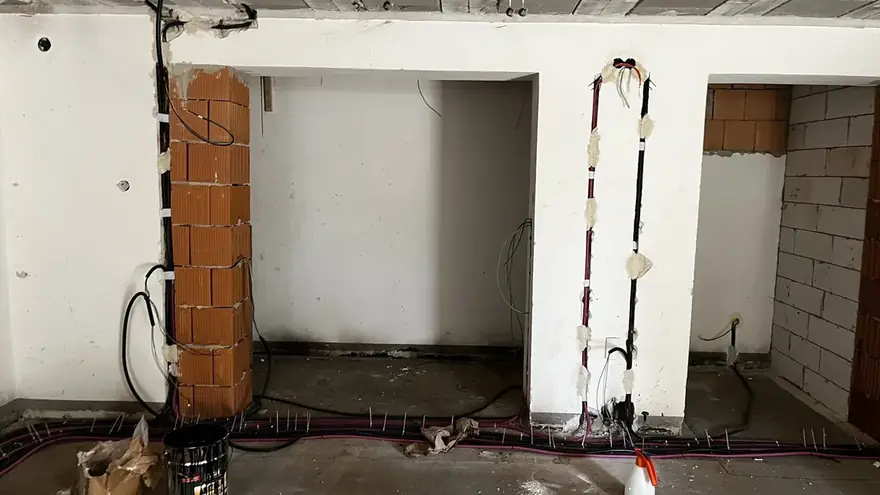
Network cabling is a star: from every wall socket one continuous cable, without joints, runs to the low-voltage cabinet. There it ends on the patch panel; a short patch cord connects the panel to the switch. The cable in the wall is never touched again; changes are made at the front, with the patch cord.
- Fixed cable in the wall: solid core, terminated on the patch panel and in the wall socket (keystone module). A plug crimped onto solid cable hanging out of the wall is not a good solution.
- Patch cord: stranded, flexible, factory-made; in the cabinet and between the socket and the device.
- Length: the permanent link is at most 90 m, the complete channel with patch cords at most 100 m. In a family house this is rarely tight, but it matters for an outbuilding or the gate.
- Separate from 230 V: the network cable runs in its own conduit and is not placed next to 230 V wiring in boxes either.
Terminating the cable: T568A or T568B?
A network cable has 4 twisted pairs (8 conductors) for the 8 contacts of the RJ45 connector. The TIA-568 standard gives two colour orders, T568A and T568B. Only the orange and green pairs swap places; there is no difference in speed.
Consistency is what matters: each cable must have the same order at both ends (otherwise it becomes a crossover cable), and the installer must use the same one everywhere in the house. We record the chosen order in the documentation.
Handover: what should the installer test and give you?
- A test on every port: wire map, open, short, split pair and length with a cable tester. If the installer guarantees a category (for example Cat6A), a certification report measured on the permanent link proves it; Fluke Networks recommends this, because in a channel test a good patch cord can hide a faulty permanent link.
- Labels: every cable at both ends, and the patch panel port should match the wall socket number.
- Point list: port – room – socket – test result.
- Photos before plastering: conduit and box positions with a tape measure in the picture.
More: Low-voltage systems · PoE switch and PoE cameras · Wi-Fi throughout the house · Which conduit goes where
Related articles from our knowledge base
Cameras and access points on one cable: PoE, PoE+ and PoE++ power, PoE budget, the 100 m channel, cable choice.
Read →Weak Wi-Fi in the house? When an extender or mesh is enough, and when you need cabled ceiling access points.
Read →Frequently asked questions
Does a family house need Cat6 or Cat6A?
For most family houses Cat6 is enough: it carries 1 Gbit/s over 100 m. If you need 10 Gbit/s over more than 55 m, or there will be many high-power PoE devices, choose Cat6A.
Is Cat7 cable worth it?
A system is only as good as its weakest link. If the socket, patch panel and the device’s RJ45 connector are Cat6A, the network will be Cat6A level. It matters more that every element is from the same category.
How long can a network cable be?
The fixed run in the wall is at most 90 m, the complete channel with patch cords at most 100 m. Longer distances need fibre.
Which is better, T568A or T568B?
Neither: both are standard and equally fast. What matters is that both ends of each cable, and the whole house, use the same one.
Can a network cable be joined?
We do not join network cable in the wall: the twist is interrupted at the joint and the cable no longer reaches its category. If unavoidable, use a factory coupler module and test afterwards.
Can network cable share a conduit with 230 V wiring?
We do not recommend it. The network cable runs in its own conduit and is not placed next to 230 V wiring in boxes either; this keeps it free of interference and safe.
What is a patch panel?
The termination in the low-voltage cabinet where the cables from the walls end in a numbered row. Short patch cords connect it to the switch; changes are made at the front without touching the cables in the wall.
Let’s talk about your project.
Tell us what you are planning and we will get back to you within a few days.
Get in touch