Low-voltage installation for family homes: network, security, intercom, KNX bus
Low voltage is the part most people forget to plan — and then the Wi-Fi signal is weak in many places, the camera picture stutters and the alarm cable runs on top of the plaster. We plan low voltage exactly like power: wall elevations, routes, cabinet, endpoint list, testing.
What is low voltage, and how many volts?
Low voltage (Hungarian: gyengeáram) covers signal and data systems at small voltages: typically 12–48 V DC, extra-low voltage under the standards (SELV, below 50 V AC / 120 V DC). The current is not “weak”; the voltage is small and the purpose is information, not energy. Examples: Ethernet cabling, coax, camera power (PoE, 48 V), alarm (12 V), intercom, KNX bus (29 V), audio, irrigation control.
Low-voltage cables must be routed separately from power cables (separate conduit, prescribed distance, perpendicular crossings), otherwise the 230 V line disturbs the signal. That is why one designer should oversee both — with us it is the same team: power installation.
Which low-voltage systems do we install?
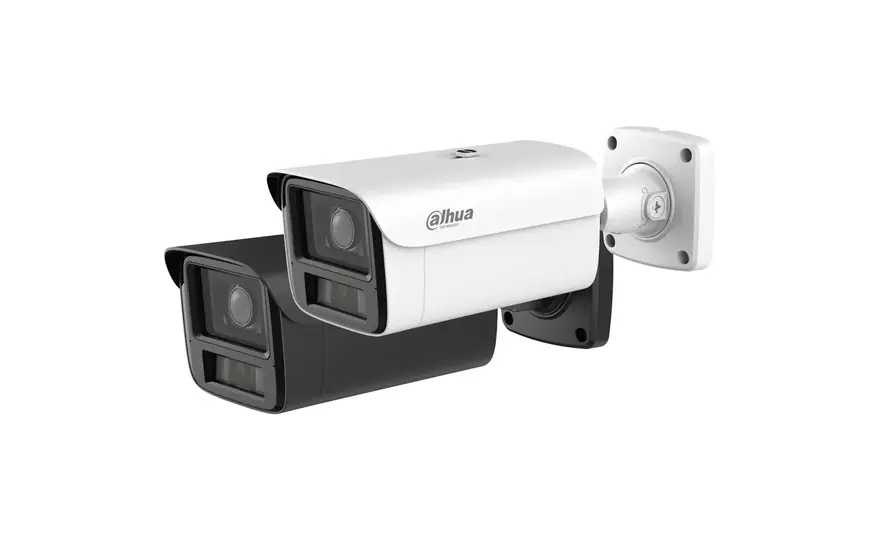

How much does a CCTV or access control installation cost?
| System | Typical scope for a family house | Labour | Materials (estimate) |
|---|---|---|---|
| Structured cabling | 20–30 Cat6A endpoints, 12–24 port patch panel, switch, 2–3 Wi-Fi points | HUF 300,000–600,000 | HUF 600,000–1,200,000 |
| CCTV | 4–8 IP cameras, PoE switch, NVR 2–4 TB | HUF 150,000–350,000 | HUF 350,000–1,300,000 |
| Alarm | 8–16 zones, 6–10 detectors, siren, keypad, GSM/IP communicator | HUF 150,000–300,000 | HUF 250,000–700,000 |
| Access control | 2–3 doors/gates, readers, electric locks, controller | HUF 100,000–250,000 | HUF 200,000–600,000 |
| Video intercom | 1 outdoor station, 1–2 indoor monitors, phone forwarding | HUF 50,000–120,000 | HUF 120,000–600,000 |
Our company is subject-exempt from VAT (Hungarian small-business exemption), so private clients pay 0% VAT.
Price depends on device quality and the number of endpoints; the cabling itself is cheap if it goes into conduits before bricklaying in a new build — and expensive afterwards. We can give an itemised quotation based on the drawings/endpoint list.
More on cameras (wired or Wi-Fi, how many you need, GDPR): CCTV installation. Alarms: alarm system installation.
Why one low-voltage cabinet?
A 19-inch rack in the plant room or a wardrobe: patch panel, switch, router, NVR, alarm panel, KNX power supply, access controller, UPS — in one place, ventilated, labelled. Every low-voltage cable terminates at one point, an extension (new camera, new access point) is one patch cable, and troubleshooting is not a search in the attic.
When should low voltage be planned?
In a masonry house before bricklaying, because conduits and boxes go into the walls; cables for ceiling Wi-Fi points, cameras and the outdoor intercom must be placed before plastering. In a precast double wall even earlier: before the production drawings, because conduits and boxes are cast into the shell at the factory. The good news: once the conduit is in, a new cable can be pulled any time. That is why we plan spare conduits everywhere. We prepare the low-voltage construction drawings with our design partner: electrical design. In existing houses we can also retrofit wireless devices: Shelly, Sonoff and Home Assistant installation.
Steps of building a home network
- 1Needs survey and wall elevations
Room by room we survey where the TV, workplace, console, printer, smart devices, cameras and access points will be. Ideally these already appear on the interior designer’s or interior architect’s wall elevations and ceiling plans; if there are no such drawings, our team helps draw the wall elevations in AutoCAD, as DWG files. We go through the drawings with the client over several rounds.
- 2Endpoint list and route plan
Every endpoint gets a number; routes separated from power, star topology to the rack.
- 3Conduits and boxes
Before bricklaying/production; spare conduits for future needs.
- 4Cabling
Cat6A/Cat7, coax, bus cable, fibre backbone; bend radius respected, labelled at both ends.
- 5Outlets and rack
Terminating sockets, patch panel, active equipment.
- 6Testing and documentation
Every endpoint tested (cable tester, Cat6A certification on request), endpoint list and rack layout handed over.
Frequently asked questions
Is Wi-Fi enough, or do we need cables?
You need cables. Wi-Fi is fine for phones and laptops, but the TV, workstation, cameras, access points and the KNX gateway are more reliable on cable. The wired backbone is cheap if built before bricklaying, and ceiling access points on cable make the Wi-Fi faster and give better coverage throughout the house.
Wired or Wi-Fi outdoor cameras?
For a family house we recommend wired PoE IP cameras: one cable carries power and data, there are no batteries, the picture does not drop when Wi-Fi is weak, and the recorder stays in the house. Wi-Fi or battery cameras suit places where no cable can be pulled later, but they need regular charging or battery changes, and image quality depends on signal strength. In a new build or renovation, pull the camera cables before plastering — afterwards that is the expensive part.
Should cameras record to the cloud or locally?
For a family house locally (NVR in the rack): no monthly fee, no dependence on the internet, and footage never leaves the house. Remote viewing still works over an encrypted connection. Cloud backup can be added for the most important cameras.
Can low voltage be retrofitted in an existing house?
Yes, but it is more expensive and involves compromises: trunking, suspended ceilings, reuse of existing conduits, partly Wi-Fi bridges. We do take on retrofits.
What about cameras and GDPR?
Cameras on your own property are lawful, but they must not cover public space or the neighbour’s plot; a notice sign is required and recordings may only be stored for a limited time. We set and document the camera angles accordingly.
Which brands do you work with?
For CCTV we mainly use Hikvision and Dahua, for video intercoms DoorBird and Hikvision, for alarms Paradox, DSC and Satel, and for networks Ubiquiti (UniFi), Cisco and TP-Link (Omada). On request we also install and commission systems from other manufacturers, such as Axis, Uniview, Reolink, 2N, Akuvox, Ajax, ZKTeco or MikroTik.
Let’s talk about your project.
Tell us what you are planning and we will get back to you within a few days.
Get in touch