KNX smart home design and installation: planned, installed and commissioned by one company
KNX is the world’s most widespread open building automation standard: devices from more than 500 manufacturers speak the same language on a 29 V bus cable. Lighting, shading, heating-cooling, access, energy metering — not an app but the infrastructure of the house, working without the internet. As an official KNX Partner we design, install, program (ETS) and commission the system in one hand — the same team that does the electrical installation.
What is KNX and how is the system built?
KNX is a decentralised bus system: every device (switch, sensor, actuator) connects with its own intelligence to a common green bus cable and communicates with messages (telegrams). There is no central computer whose failure would stop the house — if one actuator fails, the rest keep working.
| Element | What it is | Example |
|---|---|---|
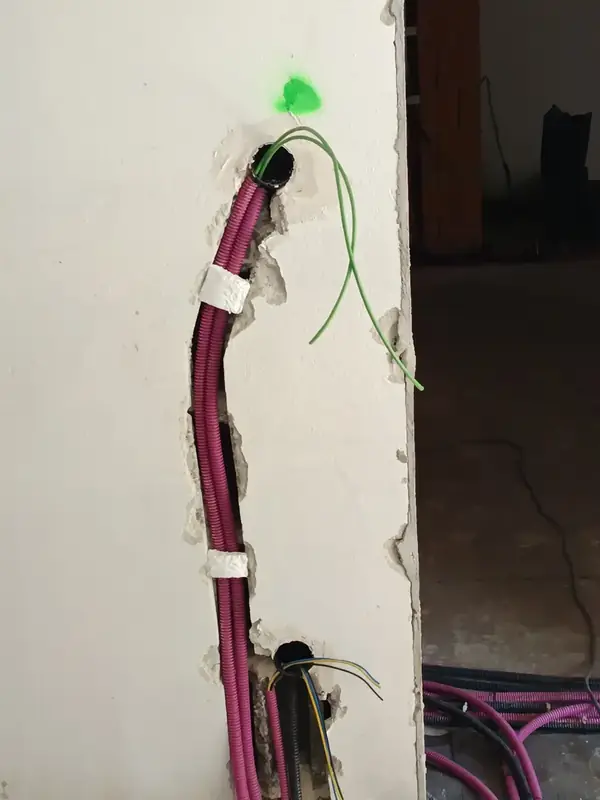
| Bus cable | shielded 2×2×0.8 mm² green cable, 29 V SELV — in the low-voltage route | to every switch, sensor, actuator |
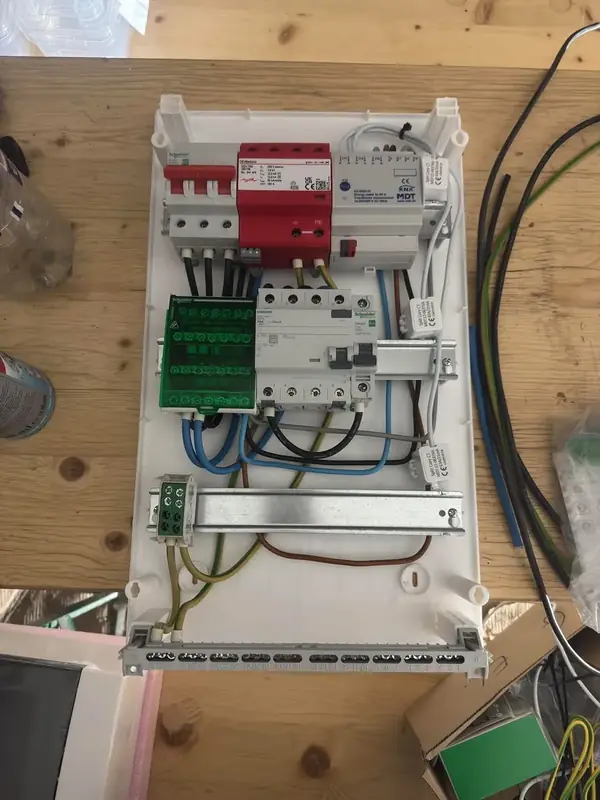
| Power supply | 29 V supply for the bus, per line | in the distribution board |
| Sensors | anything that puts information on the bus | KNX push-button, presence detector, KNX thermostat, weather station, window contact |
| Actuators | anything that executes | switch actuator (lighting), dimmer, blind actuator, heating actuator, energy-metering actuator |
| Interfaces | connection to the outside world | IP gateway (phone app, visualisation), DALI gateway, Modbus to the heat pump |
| ETS | the single, manufacturer-independent KNX programming software | we hand over the project file — any KNX integrator can continue |
What does KNX control in a family house?
KNX, Loxone or a wireless smart home?
| Criterion | KNX | Loxone | Wireless (Zigbee, Z-Wave, Wi-Fi) |
|---|---|---|---|
| Standard | open, ISO/IEC 14543; 500+ manufacturers | proprietary, one manufacturer | partly open, vendor ecosystems |
| Vendor independence | any manufacturer’s device can be swapped, still available in 30 years | tied to the vendor | tied to the app/cloud |
| Cabling | bus cable (29 V) to every sensor; ideal in new builds | bus cable + own modules | no cable; retrofittable |
| Reliability | decentralised: no central “brain”, one failed device does not stop the house | central Miniserver | radio interference, batteries, cloud dependence |
| Without internet | fully functional | works (local server) | many functions need the cloud |
| Cost for a 120–150 m² house (indicative) | HUF 5–8 million | HUF 6–7 million | HUF 0.6–2.3 million |
| Best for | those building for 30 years, premium and passive houses | those wanting one vendor’s ready ecosystem | existing flats, rentals, trying it out |
KNX offers unbeatable value for money and is also the most future-proof system: if you build for 20–30 years, vendor independence and cloud-free operation pay off most in the long run. If Loxone or a wireless system is the better solution for you, we will say so; we also install Loxone systems. Detailed comparison: Loxone or KNX.
How much does a KNX smart home cost in 2026?
In our experience the KNX system of a 120–150 m² family house typically costs HUF 5–8 million (about EUR 12,500–20,000): hardware about 45–55 %, design 10–15 %, installation 20–25 %, programming and commissioning 10–15 %. Our guide prices per function package for a 120–150 m² house: basic (lighting and shading) HUF 3–4 million; medium (plus heating-cooling and access control) HUF 5–6 million; full (plus energy metering and visualisation) HUF 7–8 million. These are indicative ranges: the final price follows a site survey and an itemised quote, because every house is different. Price ranges by system: What does a smart home cost in 2026?
What drives it: the number of rooms and controlled circuits, the share of dimmed/DALI circuits, the number of blinds, the visualisation requirement. What reduces it: the precast Leier double wall with bus conduits and boxes already in place from the factory — half of the site work disappears.
How is a KNX smart home installed?
- 1Site survey
For a new build we review the plans; where the wiring is already done, the existing installation, distribution board and conduits — and we discuss your requirements.
- 2Wall elevations and ceiling plans
Ideally an interior designer or interior architect draws the wall elevations and ceiling plans showing every switch, sensor, light point and blind. If there are no such drawings, our team helps draw the wall elevations in AutoCAD, as DWG files. We go through the drawings with the client over several rounds.
- 3Function list
Room by room we discuss what you want to switch, automate and see. This is the basis of the contract, not a promise that “everything will be smart”.
- 4Design
Device layout, bus plan, board layout, together with the low-voltage routes. In a precast house before the production drawings.
- 5Device list and quote
An itemised device list with makes and models; materials and labour on separate lines.
- 6Cabling
Bus cable to every sensor and actuator, power from the actuators to the loads; in parallel with the structure.
- 7Board and devices
Actuators in the board, push-buttons and sensors on the wall — Gira, Jung, Schneider Electric, Berker, ABB, MDT, Theben, Zennio devices.
- 8Programming (ETS)
Every function, scene and logic in the ETS project; the project file belongs to you.
- 9Commissioning and training
Room-by-room testing, fine-tuning after the first weeks, training the residents, documentation.
- 10Hand-over
We hand over the ETS project file and the documentation, so any KNX integrator can carry the system on.
Are you an official KNX partner?

Yes. Our managing director, Norbert Madarász, is an official KNX Partner (KNX partner number 123558, Gold level in the KNX Association partner ranking, October 2026). He completed the KNX Association certified KNX Basic and KNX Advanced courses and the KNX HVAC Specialist course for heating, cooling and ventilation control. We design and program systems with ETS Professional, to the KNX standard, and we are listed in the official KNX installer search.
| Certification | What it covers | Issuer |
|---|---|---|
| KNX Partner (KNX Basic course), partner number 123558 | official KNX Partner: design, installation and ETS programming of KNX systems | KNX Association |
| KNX Advanced course | more complex KNX systems: line couplers, topology, advanced ETS functions | KNX Association |
| KNX HVAC Specialist | KNX control of heating, cooling and ventilation (room-by-room control, valve actuators, heat-recovery ventilation) | KNX Association |
Can KNX be retrofitted?
In an existing house wired KNX is only realistic together with a renovation (the bus cable is needed); partial solutions are KNX RF (radio) devices and modules that fit into existing 230 V switch boxes. In a new build, however, the best decision is KNX preparation even if the automation comes later: bus cable and boxes in the wall, conventional switches for now — extension is possible any time without chasing. We also take on KNX retrofits and RF solutions. If the wiring is finished but the house is still under construction, after a survey we propose where a bus cable can still be pulled and what can be done with Shelly devices in the existing boxes; Home Assistant’s KNX integration brings both into one interface (smart home installation). Decision guide: KNX or wireless smart home?
What happens in a power cut or when a device fails?
KNX is a decentralised system: every device has its own control electronics, and there is no central computer. If a pushbutton, sensor or actuator fails, only its function is lost; the rest of the house keeps working. The faulty device can be replaced with a KNX device of the same function from any manufacturer and programmed from the ETS project file.
- Mains power cut: lights, motors and every 230 V load stop without power; KNX does not change that. What matters is what the system does when power returns.
- Behaviour on bus voltage failure and recovery: the actuators can be set per output for what happens (e.g. lighting stays off, blinds stop, the heating actuator continues in its previous operating mode). We test the configured behaviour at handover and record it in the handover report.
- Uninterruptible bus power supply: with a battery-backed KNX power supply, the bus, i.e. the control and monitoring functions, keeps running during a mains outage; the manufacturer recommends replacing the lead-acid batteries about every 4 years (Gira 1079 00). It does not supply the 230 V loads.
- Monitored signals: safety functions (e.g. the wind alarm for blinds) rely on regularly repeated messages; if the message stops, the output goes to a safe position. In emergency mode, the heating actuator keeps heating with a fixed valve position if the temperature value does not arrive (MDT AKH-0X00.02).
- Manual control always remains: wall pushbuttons are on the bus themselves and send no commands without it. That is why we install actuators with manual buttons, so lighting can be switched and shading moved from the distribution board even without the bus.
- Lines: a KNX line segment takes up to 64 conventional (TP1-64) devices, and with newer TP1-256 devices up to 256 per line (KNX Association). Every line has its own power supply; we plan cable lengths to the manufacturers’ data for the power supply and devices.
KNX and passive house: automation for summer comfort
A passive house hardly needs heating in winter — in summer the question is how to keep the heat out. The KNX weather station moves the external blinds by sun position and radiation, temperature sensors open the ventilation bypass at night, and it all runs without anyone pressing a button. The passive house page explains it.
Related articles from our knowledge base
The deciding factor is whether the walls are already plastered. Comparison, package prices, pitfalls.
Read →What DALI does, when you need a KNX–DALI gateway, and when wireless Casambi is enough.
Read →What the weather station measures, how the wind alarm protects blinds, and what happens in a power cut.
Read →Light and heavy-duty corrugated, rigid Mü-II and Mü-III conduit: location, 320 or 750 N, and what size the cable needs.
Read →Light that follows the time of day: what standards say about non-visual effects, and how to build it with DALI DT8, KNX or Casambi.
Read →Data Secure and IP Secure, tunnelling and routing, VPN remote access, manual control and the Cyber Resilience Act.
Read →What the Loxone Miniserver and Tree do, how KNX differs, when to choose which, and how Gira and MDT devices work together.
Read →DALI-2, D4i, DT6/DT8, KNX–DALI gateways (MDT, Gira, ABB, Lunatone) – what to check, based on datasheets.
Read →Thermostatic valves, smart radiator thermostats, underfloor heating, heat pumps and KNX – and what the law requires.
Read →What supply the unit needs, where the controls go, and what the Zehnder ComfoConnect KNX C does – based on manufacturer data.
Read →Public price ranges by system – Shelly, FIBARO, Home Assistant, Grenton, Loxone, KNX – and what drives the total.
Read →How they differ, whether you need a hub or a Thread border router, what a Matter bridge is, and when KNX or DALI is better.
Read →The 290 kW and 70 kW thresholds and deadlines of Directive (EU) 2024/1275, Hungarian rules and ISO 52120-1.
Read →Submeter or smart meter, when you need a MID meter, and how to meter solar, EV charging and a heat pump together.
Read →Frequently asked questions
What happens without internet?
Nothing. KNX is a local bus system; every switch, automation and control works without the internet. The internet is only needed for remote access from your phone and for weather forecasts.
Can it be controlled from a phone?
Yes, via an IP gateway and a visualisation server (e.g. Gira X1, Home Assistant KNX integration) — on the local network and over a secure remote connection. But the house is fully usable with KNX push-buttons without a phone; the phone is a convenience, not a requirement.
Do I need a separate app for every system?
No. You do not need 5–10 separate apps on your phone: lighting, shading, heating-cooling, cameras, intercom and alarm are all in one interface, in one place.
What KNX qualifications do you have?
We are an official KNX partner: our managing director, Norbert Madarász, holds the KNX Partner (KNX Basic, partner number 123558), KNX Advanced and KNX HVAC Specialist certificates from KNX Association certified courses; the latter covers KNX control of heating, cooling and ventilation.
Which manufacturers’ devices do you install?
The point of KNX is that any certified manufacturer’s device can be used and replaced later. We typically work with Gira, Jung, Schneider Electric, Berker and Busch-Jaeger push-buttons and MDT, ABB, Theben, Zennio, Siemens and Hager actuators; you choose the visible fitting range.
Can it be extended later?
Yes, that is the nature of the bus: a new actuator in the board, a new push-button on the bus, programmed in ETS. That is why we plan spare space in the board and spare conduits in the walls.
What is ETS and why should I get the project file?
ETS is the single, manufacturer-independent KNX programming software. The project file contains the entire logic of the house; with it, any KNX integrator can continue the work — you are not tied to us. You receive the project file and documentation at handover.
How much does a KNX smart home system cost?
As an indicative range, the KNX system of a 120–150 m² house typically costs HUF 5–8 million (basic: lighting and shading HUF 3–4 million). The final price follows a site survey and an itemised quote, because every house is different.
Can KNX be installed after the wiring is finished?
Partly: where a bus cable can still be pulled (e.g. into an empty conduit before plastering) KNX can go in; elsewhere Shelly or KNX RF devices in the existing boxes. Home Assistant brings both into one interface. We propose this after surveying the installation.
Who services and extends the system later?
We take on extensions and changes; since we hand over the ETS project file, any KNX integrator can continue the work.
Is KNX worth it in a 100 m² house?
If you build for 20+ years and want lighting, shading and heating to work together, yes — size does not matter, the number of functions does. In a smaller house even the basic package (lighting + shading) adds real comfort and can be extended later.
Let’s talk about your project.
Tell us what you are planning and we will get back to you within a few days.
Get in touch